

Novel, essay, memoir or picture book
From your manuscript to a professional book, in minutes.
Book layout software for indie authors: 15 typographic templates, AI to refine your chapters, cover generator, export to epub, PDF and docx.
Free to start, no credit card required
New: build the bible for your novel15
Typographic templates
3
Export formats
100%
Your rights, your data
The transformation
From raw text to finished book.
Import your manuscript in Markdown, docx, ODT or PDF. Folio Studio applies professional typography and the right export format in seconds.
The transformation
From raw text to finished book.
Chapter I: The Arrival
It was an autumn night I shall not soon forget. Rain struck the windows with metronomic regularity.
My host had left the room an hour earlier. I could hear him pacing upstairs, his heavy tread wearing a groove between the library and the bedroom.
Folio Studio
It was an autumn night I shall not soon forget. Rain struck the windows with metronomic regularity.
My host had left the room an hour earlier. I could hear him pacing upstairs, his heavy tread wearing a groove between the library and the bedroom.

📖
epub
All e-readers
🖨️
Print-ready
📝
docx
For publishers
How it works
Book layout in four steps.
Import your manuscript
Drop your .md, .pdf, .docx or .odt files. Folio Studio automatically detects your chapters, prologue, epilogue and appendices.
Choose a template
15 carefully designed typographic templates, from classic novel to poetry, thriller and fantasy. Preview in real time.
Refine with AI
Edit chapter by chapter. The AI offers summaries, style analysis, an opening rewrite and conservative proofreading. Every plan includes a clear credit balance.
Export as epub, PDF and docx
Download your book as epub (free), print-ready PDF or docx. Ready for Amazon KDP, Apple Books or your publisher.
The manuscript bible keeps every thread of your story connected.
Folio Studio analyses each chapter in context, organises characters and relationships, then flags possible inconsistencies before they disappear into the manuscript.
- CharactersProfiles, aliases, roles and sourced details grow as the story progresses.
- RelationshipsLasting connections stay readable without turning every passing interaction into a relationship.
- InconsistenciesConflicting facts are brought together with their passages so you can make the final call.
Nothing changes your bible without your approval. AI can make mistakes, so the final decision always remains yours.
Explore the manuscript bibleFeatures
Everything an author needs
Everything you need to turn a manuscript into a finished book. Explore each piece in detail.
15 typographic templates
A layout for every genre: novel, thriller, essay, poetry, fine book. Real-time preview.
See the templatesBible, AI and export
Keep track of your novel with the manuscript bible, refine chapters with AI, then export to epub, PDF and docx with your cover.
Explore the features


Illustrated books and photo albums
A dedicated mode for image-only books: children's albums, travel books, portfolios. Fixed Layout ePub and high-resolution PDF.
Create an illustrated bookPlans
Choose your plan.
Preview your book in 2D and 3D, whatever your plan.
Template Classic
Emily Carter
Shadows of the Palace
It was still dark when Lea Morgan descended the steps of the old palace. Her footsteps echoed on the stone floor, a sound she would recognise anywhere, the sound of chosen solitude.
Under her arm she carried a sheaf of papers she had not yet dared read. The letter had arrived the previous evening, slipped under her door without explanation. Three pages of trembling handwriting, as if dictated in fear.
Some secrets are like ghosts. They do not disappear; they wait.
Export formats
Included
- 1 active project at a time
- Classic and Minimal templates
- epub + watermark-free PDF export
- 1 introductory AI action included (summary, style or rephrasing)
- 1 full-page illustration
- Import .md, .pdf, .docx, .odt (5 MB per file, 1 MB extracted content)
- Cover image upload
- Customisable page numbers
- Text and heading alignment
- 3 body fonts + 3 heading fonts
Not included
- Multiple projects
- Manuscript bible for novels and fiction (Pro)
- Sage, Ink, Floréal templates (Starter+)
- Romance, Fantasy, Noir… templates (Pro)
- docx export
- Print export included from Starter (otherwise €4.99 per project)
- Advanced cover studio and AI generation (Pro)
- More AI credits (100/month with Starter)
- Additional fonts and advanced typography
- Illustrated book mode (albums, children's books)
Your cover, from the studio to the printer
Design your cover, preview the book in 3D, then export a file ready for the printer. It all happens in one place.
See your book in 3D
Spin a true-to-life 3D mockup: front cover, spine and back cover, with thickness computed from your page count.
The full cover, print-ready
Export your whole cover in one piece: front cover, spine and back cover. Folio Studio computes the spine width from your page count, adds the bleed and reserves the barcode zone, matching the Amazon KDP template.
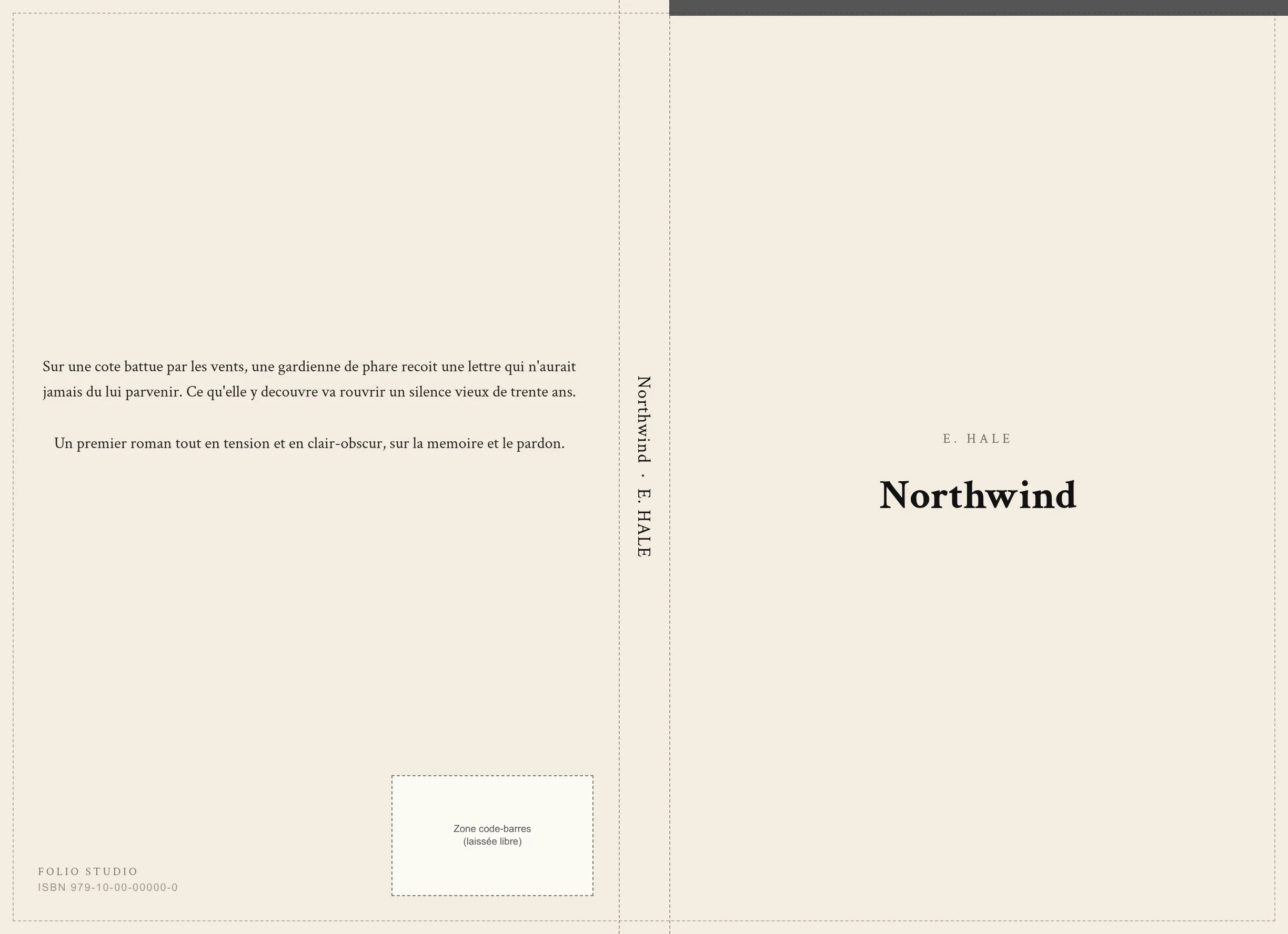
- Automatic spine width
- Bleed included
- Reserved barcode zone
- Official KDP template
Cover studio
From Starter: title overlay, customisable back cover and spine (text, colours, type), 5 layouts, precise placement. On Pro: filters and vignette, fleuron, rule, frame and spine logos.
True-to-life preview
2D and 3D views, zoom magnifier and a “Flip through a sample” demo: what you see is what prints.
300 DPI print export
High-resolution PDF with compliant margins and bleed, ready to upload to Amazon KDP or send to your printer.
A spine that stands out on the shelf
It is the only part you see when the book sits on a shelf. Folio Studio lets you customise it fully, from text to image, with a spine-only preview and the 3D render.
Text and colours · from Starter
- Title and author on the spine
- Background colour and text colour
- Font, size and letter spacing
- Separator ornament (toggleable)
Image and effects · Pro
- Background image with draggable crop
- Veil and filters to keep text readable
- Up to 3 placeable logos (size, position, rotation)
- Auto-fitted to the computed KDP wrap spine
Text, colours and typography (front, back, spine) from Starter. Background images, filters, effects, ornaments and placeable logos on Pro.
Folio Student
Are you a student?
Folio Student is our dedicated version for dissertations, internship reports, theses and academic projects. University templates, automatic table of contents and pagination, print-ready PDF export. Pricing from €1.99/month for verified students (-50%), €3.99/month otherwise.
Discover Folio Student →Folio Student
Latest academic guides
Vancouver Style 2026: Medical Citation Guide (ICMJE)
Vancouver style for medical writing: superscript in-text numbers, reference format, NLM journal abbreviations and examples by source. ICMJE-aligned, 2026.
13 mintheseUK PhD Thesis Format 2026: University Rules, Viva & Deposit
Check UK PhD thesis rules for formatting, discipline-specific word limits, viva, university repository deposit and the restored EThOS discovery service.
16 minnormes academiquesOSCOLA Citation Style for UK Law 2026: Complete Guide (Oxford Standard)
OSCOLA 5th edition guide for UK law theses: footnotes, cases, legislation, secondary sources, international law and the main 2026 changes.
14 minGuides & tips
Resources for authors
KDP Paperback Cover Guide 2026: Spine, Bleed, Barcode and Template
How to make a full paperback cover for Amazon KDP: spine width calculation, bleed, barcode zone, trim sizes, and the official template. Step-by-step 2026 guide.
10 minpdf printBook Print Dimensions: The Complete Guide (Trim Size & 300 DPI)
Print book dimensions for self-publishing: standard trim sizes, margins, bleed, 300 DPI and KDP vs IngramSpark templates. Everything for a print-ready PDF.
13 minoutils auteursThe Best Fonts for Novels: A Typography Guide for Authors
Choosing the best font for a novel: serif vs sans serif, print and ebook readability, size, leading, pairing and licensing. A typography guide for authors.
12 minFAQ
Frequently asked questions
Is Folio Studio free?
Yes. The Free plan lets you create 1 project and export it to epub and watermark-free PDF. Starter (€4.99/month) adds 10 projects, DOCX and print-ready exports. Pro (€9/month) adds unlimited projects and every advanced tool.
What export formats are available?
All plans include epub and watermark-free PDF export. Starter adds DOCX and print-ready exports. Pro adds unlimited projects and every advanced tool.
Can I import a Word, PDF, ODT or Markdown file?
Yes. Folio Studio supports importing Markdown (.md), Word (.docx), OpenDocument (.odt) and PDF files. Your chapters are automatically detected and structured on import.
Do I need to know Markdown to use Folio Studio?
No. The built-in WYSIWYG editor lets you write and format your text without touching Markdown. Authors who prefer Markdown can also use it directly.
Does Folio Studio work on Windows, Mac and Linux?
Yes. It's a web application that runs in all modern browsers (Chrome, Firefox, Safari, Edge), with no installation required, regardless of your operating system.
Are PDF exports compatible with Amazon KDP and print-on-demand services?
Yes. Print-ready PDF exports meet the specifications of Amazon KDP, IngramSpark, and local printers: asymmetric binding margins, pocket, medium and large formats.
Does Folio Studio offer an AI cover generator?
Yes. Pro users get 10 credits per month. Each credit generates 4 variants saved in the gallery, so you can choose your favourite. HD enhancement of that selection costs 1 additional credit.
How do chapter AI credits work?
Free includes 1 introductory action, Starter 100 credits per month and Pro 200. Rephrasing costs 1 credit, style analysis 2, a summary 1 to 5 depending on length, and proofreading 4 to 28. Subscribers can buy non-expiring top-ups; cached and failed calls cost nothing.
Does Folio Studio handle illustrated books and photo albums?
Yes. Starter lets you create 1 illustrated book project up to 30 pages, with unlimited re-exports. Pro includes unlimited illustrated projects, up to 100 pages per book, in Fixed Layout ePub or high-resolution PDF.
I'm a student, should I use Folio Studio?
No. Folio Studio is built for authors of novels, essays and illustrated books. For dissertations, theses, internship reports and academic work, use Folio Student: dedicated subdomain, academic templates, APA / MLA / Chicago standards, reduced pricing for verified students.