
Pricing
Simple and transparent
Start for free. Upgrade when you're ready. 2D and 3D book preview included in every plan.
The manuscript bible is included with Pro
Pro planAnalyse fiction with the Pro plan's AI credits: characters, relationships, source passages and possible inconsistencies, always submitted for your approval.
- Secure payment via Stripe
- No monthly commitment
- Cancel in one click
- Data hosted in the EU
Your cover, from the studio to the printer
Design your cover, preview the book in 3D, then export a file ready for the printer. It all happens in one place.
See your book in 3D
Spin a true-to-life 3D mockup: front cover, spine and back cover, with thickness computed from your page count.
The full cover, print-ready
Export your whole cover in one piece: front cover, spine and back cover. Folio Studio computes the spine width from your page count, adds the bleed and reserves the barcode zone, matching the Amazon KDP template.
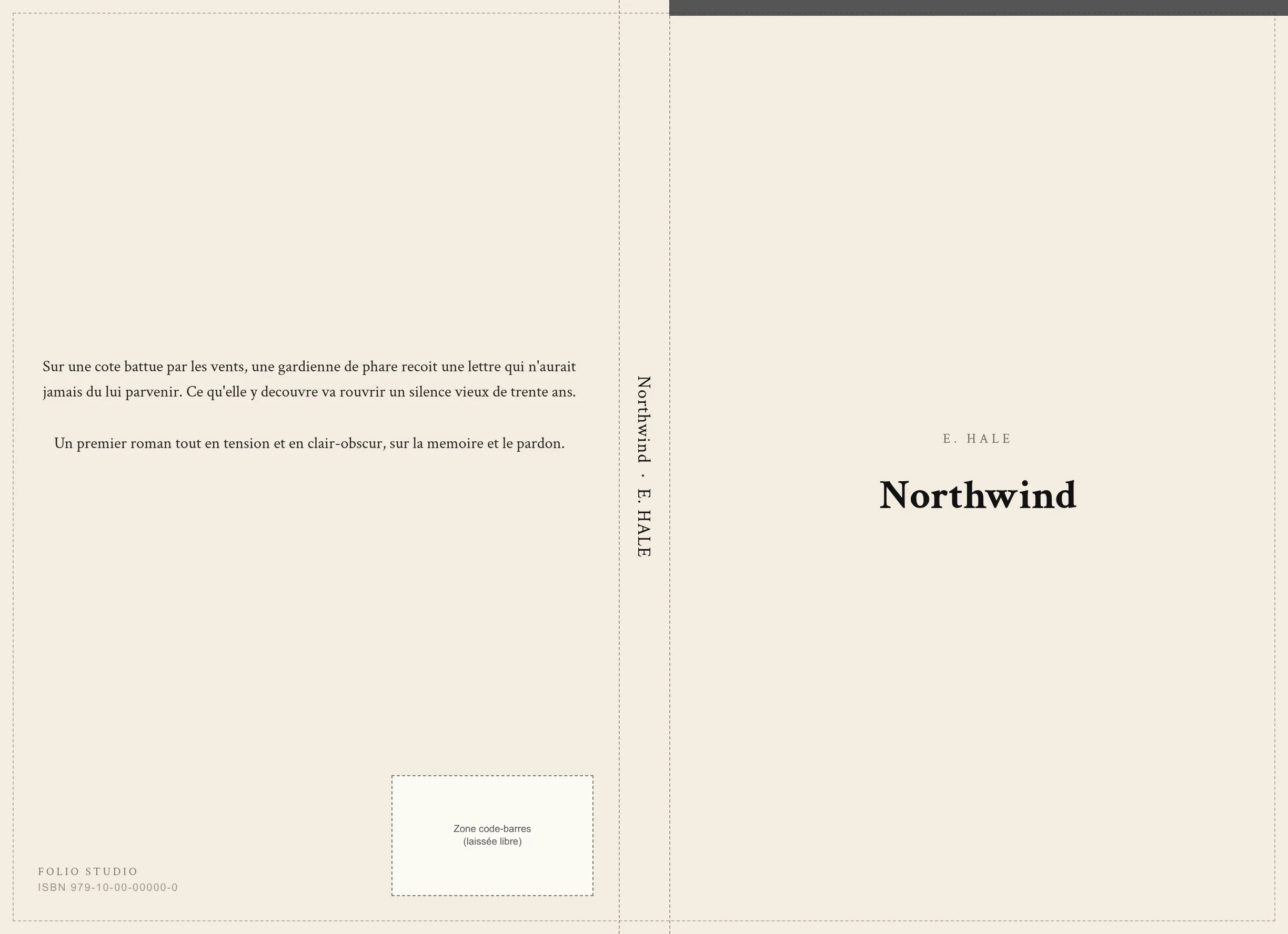
- Automatic spine width
- Bleed included
- Reserved barcode zone
- Official KDP template
Cover studio
From Starter: title overlay, customisable back cover and spine (text, colours, type), 5 layouts, precise placement. On Pro: filters and vignette, fleuron, rule, frame and spine logos.
True-to-life preview
2D and 3D views, zoom magnifier and a “Flip through a sample” demo: what you see is what prints.
300 DPI print export
High-resolution PDF with compliant margins and bleed, ready to upload to Amazon KDP or send to your printer.
A spine that stands out on the shelf
It is the only part you see when the book sits on a shelf. Folio Studio lets you customise it fully, from text to image, with a spine-only preview and the 3D render.
Text and colours · from Starter
- Title and author on the spine
- Background colour and text colour
- Font, size and letter spacing
- Separator ornament (toggleable)
Image and effects · Pro
- Background image with draggable crop
- Veil and filters to keep text readable
- Up to 3 placeable logos (size, position, rotation)
- Auto-fitted to the computed KDP wrap spine
Text, colours and typography (front, back, spine) from Starter. Background images, filters, effects, ornaments and placeable logos on Pro.
Compare plans in detail
Everything that changes from one plan to the next, at a glance.
| Feature | Free | Starter | Pro |
|---|---|---|---|
| Projects | 1 active | 10 | Unlimited |
| Layout templates | 2 | 5 | 15 |
| epub export | |||
| Watermark-free PDF export | |||
| docx export | – | ||
| Print export (KDP) | €4.99/project | ||
| Full KDP cover (front + spine + back) | – | ||
| Cover studio | – | Standard | Advanced |
| AI cover generation | – | – | 10 credits/month · 4 variants/credit |
| Full-page illustrations | 1 | 5 | 50 |
| Illustrated book mode (albums) | – | 30 pages | 100 pages |
| Included AI credits | 1 introductory action | 100 / month | 200 / month |
| Manuscript bible (fiction) | – | – | ✓ with AI credits |
| Fonts (body + headings) | 3 + 3 | 10 + 10 | 27 + 26 |
| Max import per file | 5 MB | 20 MB | 50 MB |
| Extracted content per project | 1 MB | 5 MB | 50 MB |
Frequently asked questions
Can I change plan at any time?
Yes. You can upgrade whenever you want: access is immediate and the amount is prorated by Stripe. You can also downgrade or cancel from your settings.
Is there any commitment?
The monthly plan has no commitment and can be cancelled at any time. The annual plan covers 12 months at a reduced rate (around 20% off).
How do I cancel?
In one click from your settings, via the Stripe billing portal. Cancelling stops the renewal; you keep access until the end of the period you already paid for.
Is the Free plan really free?
Yes, free forever and no credit card required. It lets you format one book and export it to epub and watermark-free PDF. You only move to a paid plan if you want more projects, DOCX, print-ready files or more templates.
How are AI credits charged?
Rephrasing: 1 credit. Style: 2 credits. Summary: 1 credit per 10,000 characters, up to 5. Proofreading: 4 credits per 4,500 characters, up to 28. For the manuscript bible, a quote shows the cost before each analysis based on the selected chapters and components. Cached results and failed calls are free. Starter and Pro subscribers can buy non-expiring top-ups.
What's the difference between monthly and annual?
It's the same product. Annual is around 20% cheaper (saving €12 per year on Starter, €21.60 on Pro) in exchange for a single yearly payment.
Am I refunded if I cancel?
Cancelling stops future payments, but the current period is not refunded. If you want to try without commitment, choose the monthly plan.
What payment methods do you accept?
Credit and debit cards, via Stripe (secure payment). A receipt is emailed to you after each payment.
I'm a student, is there a dedicated price?
Yes: Folio Student (student.foliostudio.app) offers reduced prices and academic templates for dissertations, internship reports and theses. It's a separate product built for university documents.